Welcome to Get Interview AI! Here's what you need to know:
Get Interview AI is your AI-powered co-pilot designed to help you crack any job interview with confidence whether you're a coder, a marketer, a PM, or in sales. It's like having a smart assistant in your pocket that helps with resume building, mock interviews, coding challenges, and even supports you live during real interviews (yes, even on Zoom, Meet, and Teams without being detected).
Whether you're applying for your first job or trying to land a $100K+ role, Get Interview AI gives you everything you need to prepare, practice, and perform like a pro.
You can use Get Interview AI on:
For the best performance (especially during live interviews), we recommend Google Chrome on a laptop or desktop.
Want to unlock our Invisible AI Coding Assistant for Live Interviews? Here's how:
Grab the installer from our official website.
Drag the downloaded app into your Applications folder.
Register or sign in at getinterviewai.com, and complete your subscription.
Open the app and sign in using your account credentials.
Choose your preferred programming languages (e.g., Python, Java, Javascript) in the settings either on the website or inside the app.
You're ready to start practicing your technical interviews.
Ensure that Get Interview AI runs properly on your device before subscribing.
Get the latest version of the app from our website
Start a Google Meet call and share your entire screen.
If the app is visible during screen sharing, it means it's not compatible with your system.
Note
The assistant is completely invisible on screen-sharing tools; your interviewer won't
see a thing.
No matter your background, here's how to start preparing right away:
Everything works right from your browser no bulky software needed (except for coding tools on Mac/Windows).
Our coding assistant is more than just a code generator. It's your partner during the high-pressure moments of a live technical interview.
Imagine having a smart whisper in your ear during interviews that's what our AI Interview Assistant does.
You can manage your language preferences in the settings page.
Currently, we offer support for Python, Golang, C#, Rust, R, SQL, Ruby, Java, Javascript, C++, Kotlin, and Swift.
GetInterview AI is completely invisible to screen recording software, making it perfect for technical interviews.
Toggle the application window without your cursor losing focus.
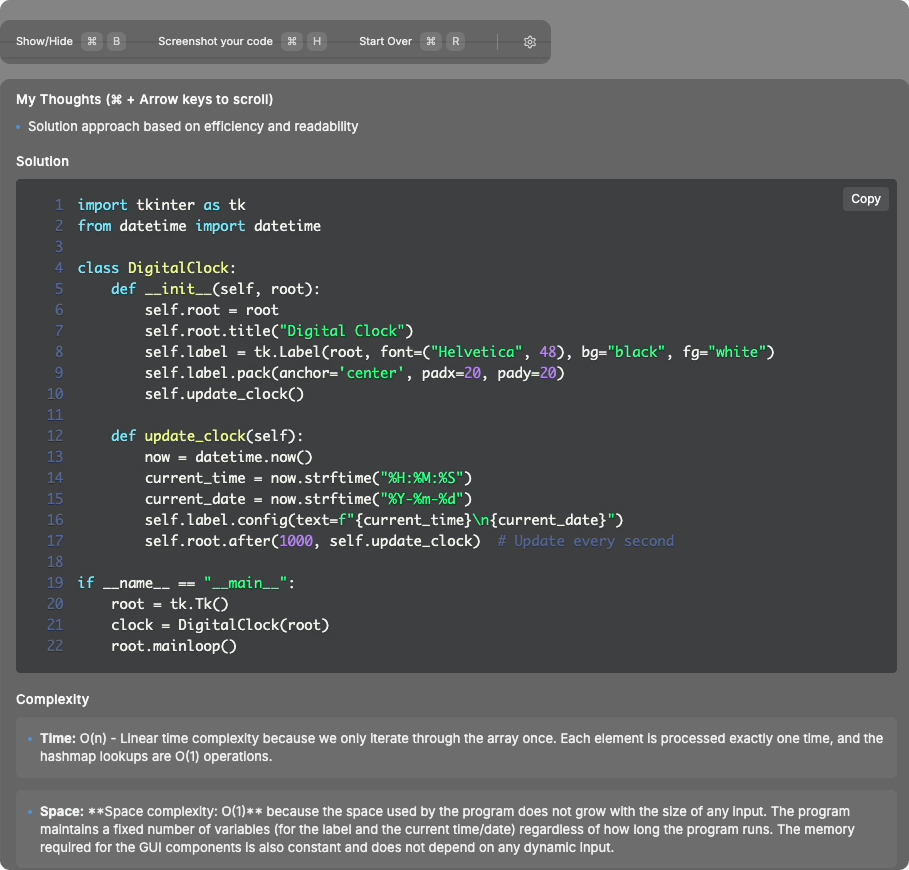
Every solution is explained step by step, and every line of code comes with comments explaining how it works.
Move the window around to overlay on top of your code editor so your eyes never wander. Position it to maintain natural eye contact during interviews.
These commands are designed to be natural and easy to remember.
Hide or show Interview Coder
Capture screenshots of the interview question
Move the window around your screen without touching the mouse
Generate an initial solution with explanations
Reset everything to start fresh with a new problem
Quit the application
Learn how Get Interview AI remains completely undetectable during interviews.
Coding interview platforms employ various detection methods to prevent cheating. Here's how they try to detect tools like Get Interview AI, and how we counter each measure.
Get Interview AI has never been detected in our real interview tests by any coding platform.
Below are the common methods platforms use to detect cheating, and how Get Interview AI makes each one ineffective. Each red box shows a detection method, with our counter-measure shown in green below it.
Interviewers will ask you to share your screen on platforms like Zoom, Google Meet, HackerRank, and CodePad.
App is invisible to screen sharing software and screenshots
Interviewers will ask you to reason out your solution and don't just want code.
Interviewers will ask you to explain your solutions. Get Interview AI comes with every line of code commented, as well as a few sentences of thoughts that will naturally lead you to a solution.
Platforms track eye movements and suspicious looking away from screen
Get Interview AI appears alongside your coding environment, so you never need to look away from your screen
Platforms will check if your cursor becomes inactive, or if you move from the active tab.
Get Interview AI is designed so that when you toggle visibility with ⌘ + B, your cursor will stay focused, and your active tab will not change at all.
Already have a resume? Let our AI analyze and upgrade it.
Make your resume stand out in seconds not hours.
For the best performance (especially during live interviews), we recommend Google Chrome on a laptop or desktop.
Practice makes perfect especially when it's AI-powered.
You don't need an app to use our platform just your phone.
Our AI Coding Assistant and Live Interview tools run outside the browser, making them completely invisible during screen sharing or live interviews. Your interviewer can't see it even with full remote access or recording enabled.
Changing your plan is simple:
All changes are reflected instantly, and you'll receive a confirmation email with billing details.
We securely process all payments through Stripe, one of the world's most trusted payment gateways.
You can pay using:
Your card details are never stored on our servers we take your security seriously.
We offer a 24-hour refund policy for our software subscription only if you can provide video evidence that the application is not functioning on your computer.
Please note: Concerns such as detection by screen-sharing software or delays in solution generation do not qualify for a refund.
Email us at [email protected]
Include your purchase information and a video clearly showing that the software is not working on your device.
If eligible, your refund will be processed within 5-7 business days.
Go to your dashboard → Billing → "Download Invoice" for each payment.
Yes! An automatic receipt is emailed to you after every successful charge.
Absolutely. Just head to your Billing Settings to update your card or personal details.
If you're not receiving any AI replies, don't worry here are a few things to try:
If the desktop app isn't launching or keeps crashing:
Your application might be hidden. Use the shortcut ⌘ + B to make it visible.
Sometimes a simple refresh resolves display issues. Use the official link to reinstall the app.
Still not working? Our tech team is just a chat away.
Browser acting weird? Here's what to do:
And remember mobile users should always use the mobile-optimized version of our site for best results.
Get Interview AI is your secret edge in technical interviews.
Sales, HR, marketing, operations Get Interview AI supports it all.
No more feeling stuck or panicked mid-interview.
Nervous before a big round? Let's rehearse.